
Step by step
-

Take a screenshot right when the bug happens
- Windows Win + Shift + S
- Mac Cmd + Shift + 4
- Android power + volume down
- iPhone side button + volume up
If the bug is about movement or an animation, a short video is better. More detail by device
-

Write a short comment
What happened and what you expected to happen.
-

List the steps to reproduce it
What you did right before, in order. For example: “1. Picked the Archer. 2. Entered Rift 1. 3. Opened the chest in room 4. 4. The game froze.”
And whether it happens always, sometimes or just once.
-

Tell us where you played
Device (PC, Mac or phone, with the model), system (Windows, macOS, Android or iOS), browser (Chrome, Firefox, Safari, Edge or Brave) and whether you played on itch.io or in the app.
-

Copy the game version
It is at the bottom left of the title screen: it says “Riftscar ALPHA” and a code, for example
5c06dc3. Copy that code. -

Your hero and how far you got
Which hero you were playing and which Rift and room you were in, if you remember.
How to take the screenshot
Take it at the exact moment of the bug, before you touch anything else.
-
Windows
- Press Win + Shift + S.
- Drag to mark the area, or pick full screen at the top.
- The screenshot is copied: paste it into the email with Ctrl + V. A notice also lets you save it.
Video: Win + Alt + R records with the Xbox Game Bar.
-
Mac
- Press Cmd + Shift + 4.
- Drag to mark the area.
- The screenshot is saved on the Desktop.
Video: Cmd + Shift + 5 and “Record”.
-
Android
- Press power + volume down together.
- Let go when the screen flashes.
- The screenshot is in Photos or Gallery, under “Screenshots”.
Video: swipe down from the top and tap “Screen record”.
-
iPhone
- Press the side button + volume up together. With a home button: home + side.
- Tap the thumbnail to crop it, or let it go.
- The screenshot is in Photos.
Video: open Control Center and tap the record button.
An example report
This is what a good report looks like: short, in order and with the screenshot attached.
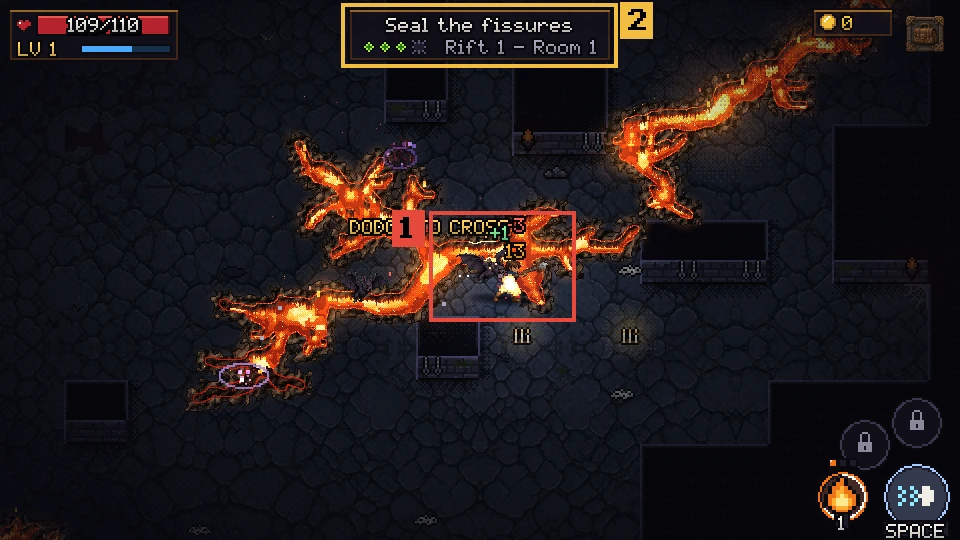
Subject: Riftscar bug: the mage gets stuck in a fissure

What happened: I dodged to cross the fissure and the mage stopped in the middle and could not move. The monsters kept hitting him.
What I expected: to cross the fissure and come out on the other side.
Steps to reproduce it:
1. Picked the Mage.
2. Entered Rift 1.
3. In room 1 I dodged right over the widest part of the fissure.
4. The mage stayed stuck until I died.
Does it always happen?  Sometimes (2 out of 3 tries)
Device and system: Samsung Galaxy A54, Android 14
Browser: Chrome
itch.io or app?: itch.io
Version (bottom left on the title screen): 5c06dc3
Hero, Rift and room: Mage, Rift 1, room 1
(Screenshot attached)
Template to send
Copy it and fill it in, or tap “Send by email” and your mail app opens with everything ready. Do not forget to attach the screenshot or the video.
What happened:
What I expected:
Steps to reproduce it:
1.
2.
3.
Does it always happen?  Always / Sometimes / Once
Device and system:
Browser:
itch.io or app?:
Version (bottom left on the title screen):
Hero, Rift and room:
(Attach the screenshot or the video)
If the button does not open your mail, copy the template and send it to hello@garigastudios.com with the subject “Riftscar bug: …”.
Prefer itch.io?
You can also leave the report in the comments of the game's itch.io page, with the same template. Riftscar on itch.io
Your privacy
We only use your report to fix the game and we do not share your email. Do not put personal data in your screenshots. Privacy policy